Posts

Fishing Hotspots AI

Image
 We are pleased to announce a major update to the i-Boating application. All our customers now have access to the Fishing AI , a large scale AI model that emulates an expert angler to identify fishing breaklines and fishing hotspots. Some of the variables that it takes into account are: Lake bathymetry/topography Point Bars Humps / Underwater Islands Channels Saddles Artificial / Man Made Structures River Bed Ledges Side Feeder Streams Pits And more... Local Knowledge for a lake gained over the years Weather Patterns Vegetation Maps I have included a tutorial video showing this in action. It is available on all platforms - Android, iOS, Windows and MacOS. 

Crowley lake depth map for fishing

Image
 Crowley lake, famous for Trout fishing is fully supported in the i-Boating app. Its one of the best trout fishing lakes in California. Crowley lake fishing map Crowley Lake Fishing Map Crowley Lake Fishing Map

Claytor Lake, Virginia, ENC Chart

Image
 We are pleased to announce the availability of Claytor lake, Virginia ENC chart.  We have tried to included most requested layers in the electronic lake depth map for Claytor , including but not limited to: HD depth contours / bathymetry Obstruction/Hazards/Shoal Areas Rocks Fish  Structures  Boat ramps Fishing Piers We have been tracking this lake in our internal tracking system even before the i-Boating app was published.  I added this in our tracking system in 2014. We were finally able to acquire enough data for this lake to release mapping for it today. I am very happy to finally be able to close that tracking bug. Its been a long time coming.  Claytor Lake Depth Map Claytor Lake Depth Map

Single marine charts folio covering UK, Ireland, France and Netherlands

 We are pleased to announce that we now have a unified folio covering UK, Ireland, France and Netherlands .  The folio also includes charts for inland rivers and canal system in UK and Netherlands (including depth maps with HD bathymetry). In addition to coastal charts, we have also incorporated French inland rivers and lake maps. UK Ireland France Netherlands Its already available for Android and iOS. It will be available soon for MacOS and Windows.

Offline i-Boating WMTS (Web Map Tile Service - Marine Charts & Lake Maps)

Image
 We are pleased to announce the availability of i-Boating WMTS , an application supported on Windows &  MacOS.  The i-Boating WMTS is  a dynamic web map tile service that runs on your localhost and provides coverage for marine charts and lake depth maps. Its the most customizable marine WMTS and compatible with QGIS, ArcGIS, ArcGIS online, Grassgis and any software compatible with the OGC WMTS standard. Its the only Marine Charts WMTS that's capable of running offline and more customizable than a chartplotter. Offline support: Designed for private internal use to run on your localhost even when offline Change depth unit to feet, meter or fathom Tile size can be customized to  256, 512 or 1024 Both http and https support For https, add your own SSL certificate or use our bundled self-signed certificate Compatible with most GIS software and web - applications including QGIS, ArcGIS, ArcGIS online, GrassGIS and platforms like Here Maps, Google Maps, javascript...

i-Boating Video Tutorials

 We have created a few video tutorial on using the i-Boating app. The tutorial videos are organized in a playlist.  Youtube Playlist for i-Boating tutorial videos Here is a list of all topics covered in our video tutorials. Download Offline Marine Charts Creating New WayPoints Auto Routing Chart & App Settings Manual Route Editing Marine Weather Forecasts GPS Features (Auto Follow, Record, Route Assistance, Goto WayPoint) The video have been created on iOS (iPhone/iPad).   The steps are similar on Android, Windows & MacOS.

NMEA alarms for depth and wind speed are now available in i-Boating

Image
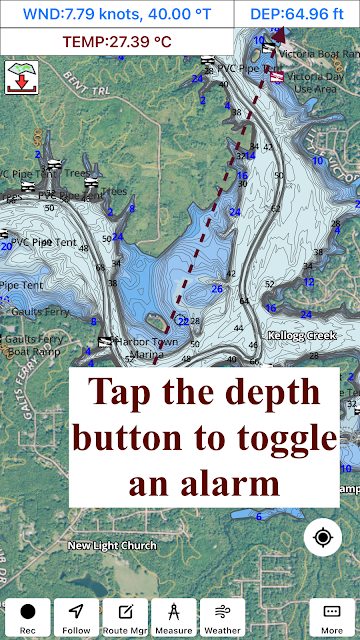
 The latest version of the i-Boating application now lets you set an alarm for depth and wind speed. Its supported on all platforms (iOS, Android, Windows and MacOS). You must have a working NMEA instrumentation set up in the i-Boating application to use these features. Simply tap/click on the blue text/button showing the depth to set the alarms, adjust thresholds etc. I've included below a few screenshots with this feature in action.